PlayToEarn




















 Plus
Plus



Almost 6 months after the release of version 0.11, the developers of The Sandbox are back with the launch of Game Client 0.12, adding in a number of new features, such as Multiplayer Lobbies, and various improvements that are all mostly focused on making it easier and faster than ever to discover and jump into diverse web3 gaming experiences in this voxel-based metaverse.
What’s New in The Sandbox Game Client 0.12?
Game Client 0.12 primarily focuses on enhancing social play and improving the multiplayer gameplay experience, and as such introduces Multiplayer Lobbies, Quick Play, new abilities, auto-saving of game progress in certain Experiences; WWise-powered in-game sound, adaptive chat system, new NPC behaviors, better UI & menus for simpler onboarding of new players; the ability to enter Experiences through the global map or in-game dashboard, and the option to preview NFTs in 3D galleries and see how they fit right on your Avatar.
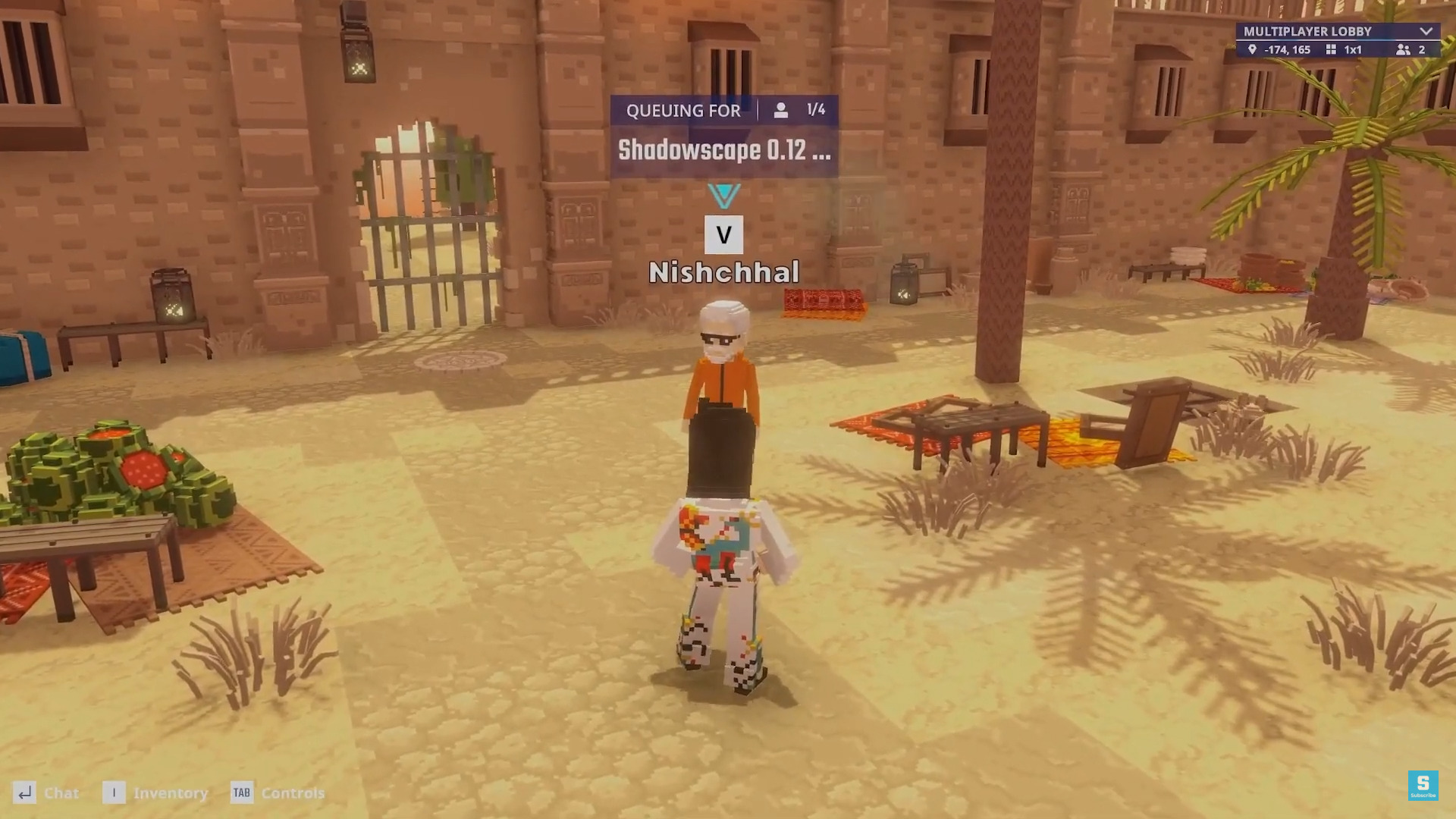
Matchmaking is now much better and faster thanks to the addition of Multiplayer Lobbies and Quick Play. If you want to play a game that requires at least 2 players to work properly, you can now just simply press “Find Match” to be automatically placed in a queue and easily matched up with other players. In case the matchmaking process finds a couple of players but hasn’t managed to fill up the game yet, you will then be all placed into the new Multiplayer Lobby system in which you can easily talk with each other before the match is ready to go.
As you wait in the lobby, you can chat, see what others are queuing up for, invite friends, and join the games others are playing. This lobby does not only show players queueing up for the same experience, but it puts in basically anyone queuing up for any game at the same time as you are. While waiting, you can also see a Queue Card in the top part of the lobby screen so that you know what the minimum and maximum amount of players are needed for the game to start, and once there is enough players to get going, the experience will launch on its own. You can also see a Queue Card above the head of each player to get info such as what game they’re waiting to play and what the minimum and maximum player numbers for that game are. The Queue Card also gives you the option to join the experience the player is queuing for, so if someone is waiting to play something you’ve been wanting to check out earlier, then this is a great way to find and join up with players that are curious about the same Experience.
If you don’t want to be placed into a multiplayer lobby, then you should use the new Quick Play option on the Play Menu instead, as that will place you directly into any game that is ready to instantly start. When you want to play with friends, simply use the Friends Tab to join their lobby or session.
The chat system has been upgraded to adapt to the type of Experience you’re playing. This means that it now switches between local multiplayer channels and global chat tabs. You can use one or the other, or both types of chat channels depending on the game. In the Metaverse Chat channel, you can communicate with anyone who is currently inside this gaming metaverse, even if they’re not playing the same experience. Single-player or social experiences should automatically place you in the Metaverse Chat, but if you’re playing a multiplayer-focused gameplay Experience, the system will then shift you over to the Local Chat, as you want to be able to talk specifically with players that are in the same game as you are.
Anyone making single-player or multiplayer experiences can now offer saved data, meaning players can now have their progress automatically saved in order to continue where they left off after leaving the session. Saved data includes score, in-game currencies, resources, inventory collectibles, and more. If the game supports saved data, you should be able to come back to the Experience and see all your progress retained. This can help developers create even more engaging Experiences with long-term progression systems that will keep players coming back for more.
Builders now have the option to use new NPC behaviors to deliver more dynamic gameplay experiences. It’s now possible to add Friendly NPCs that have the ability to follow you around as companions, collect certain types of items, heal you, and run away from certain enemies that they’re terrified of.
Water effects look more realistic now and feature sun reflections, immersive caustic lighting, a depth-darkening effect, foamy shores, and realistic shoreline rendering. After adding Double Jump, Fly, and Air Dance in the previous release, this version introduces 2 new movement abilities: Dash and Glide. The former lets you dash forward even in mid-air, while Glide is useful when jumping from high spots and works similarly to the gliding found in the Batman Arkham games.
If you want to see an Experience’s NFTs or take a look at the Battle Pass rewards during Seasons, you can now do so directly from the game client through an interactive 3D gallery that lets you preview the assets on your Avatar. Another welcome integration is the option to browse and launch featured Experiences straight through the in-game dashboard, making it much easier to find cool new games to play without having to leave the launcher. The global map can also be accessed through the client, making it another way to easily find new games to jump right into and enjoy alone or with your friends.
Whether you’re a returning player or someone who’s been thinking of trying out this metaverse, the release of Game Client 0.12 makes it a great time to easily jump in and start enjoying a variety of engaging metaverse experiences. You can download it now for free by creating an account on the official website using Google, email, or crypto wallet.
About The Sandbox
The Sandbox is one of the most well-known blockchain-powered social gaming metaverses. This voxel-based virtual world has brought in plenty of popular brands to the metaverse, including Ubisoft, Atari, The Smurfs, The Walking Dead, Snoop Dogg, and many more. Play branded and community-made experiences alone or with your friends and start building your own using the platform’s own no-coding Game Maker tool.
Create to earn the $SAND ecosystem token by participating in game jams and showcase your 3D modelling skills in contests requiring the use of this metaverse’s own NFT creator software, VoxEdit. Play to earn $SAND by participating in limited time events and reward-packed seasons such as the upcoming Alpha Season 6.
This week, The Sandbox introduced the G-SHOCK Droid Collection by Casio, who are entering the web3 world with a metaverse game and NFT avatars.