 PlayToEarn




















 Plus
Plus



If you’ve been on the lookout for an open-world title that uses blockchain technology, chances are you’ve come across Valhalla, a Web3 MMORPG by the Floki Inu team. This beginner’s guide covers what you need to do in order to properly get into and enjoy Floki Inu Valhalla.
What Is Valhalla?
In case you’re unfamiliar with the general idea of this blockchain title, Valhalla is a third-person NFT metaverse set in a low-poly world that is powered by $FLOKI, a relatively known memecoin in the Web3 space. It is currently in alpha and features turn-based combat that take place on hexagonal battlefields. While it was initially planned to launch on mainnet in 2023, that plan seems to have been delayed, making this a great time to get yourself used to the game mechanics in order to give you a head start once the official release takes place.
With that said, let’s find out how we can actually get started with playing this 3D metaverse.
Getting Started

Valhalla currently runs on the Optimism Goerli Testnet, so in order to get started, you will need to connect a crypto wallet. The developers suggest using a new wallet instead of your main one.
If you’re new to crypto and haven’t created a wallet yet, don’t worry; your first step should be to add the official browser extension of MetaMask, a self-custodial wallet that can be used to interact with various decentralized applications on blockchains such as Ethereum, and in this case, Optimism. Once you install the extension, simply follow the instructions to set up your first wallet.
With your wallet now set up, you now have to add the Goerli Testnet, which is a network developers use to test out their projects in a safe environment to find out and fix critical issues before deploying to mainnet. After you have added the network to your wallet and switched to it, the developers note that you should now add a couple of testnet tokens to play the alpha version. These tokens have no real value and are used primarily for testing purposes. The developers point towards this faucet by Paradigm for claiming test tokens, which does have a few requirements that you have to meet to actually use it, and those include having a Twitter account at least a month old, with at least one tweet and 50 followers. These measures are in place so as to prevent any botting, with the website claiming to only request read-only access of your profile. Make sure you check the “Drip on additional networks” box in order to successfully on the right network.
Alternatively, you may also still be able to use the Goerli PoW Faucet, which only requires inputting your wallet address. While it's still usable at the time of writing, the faucet is set to be deprecated in April 2024.
Armed with a new wallet and some tokens on the Optimism Goerli Testnet, you are now ready to get an early glimpse of Floki Inu’s flagship title made in Unity.
Gameplay

On the game’s official website, simply click on the “Play Now” button located on the main page as well as in the top right corner. This will take you to a page where you can choose from 2 different game modes: Intro & Battle Arena, and the Open World.
Both modes are browser-based and will ask you to connect your wallet before being able to play. For your first time you will need to pick the first game mode which will teach you about the game’s turn-based combat system after you create your own character by customizing your appearance and background story. When you’re done with this tutorial, you can now unlock the Open World mode.
In the Open World, you will be able to gather various resources, complete quests, take on turn-based battles and hunt for Vera, which are creatures that roam throughout the world and which can be captured if you beat them in a turn-based fight. As you explore you will randomly encounter these Veras in the form of a pop-up telling you that one has been sighted, giving you the option to choose whether you’d like to try and capture it or not.
The turn-based gameplay has you pick one creature you’d like to use in battle before it actually starts. In this case, this will be the starting Vera you chose in the tutorial. You also get to pick 3 different abilities you would like to have at your disposal, alongside potions and an amulet, the latter which you need if you want to capture the Vera, though there’s no guarantee that you will be succsessful in doing so. There currently seem to be 7 different kinds of Vera, and you can level them up as you play to make them stronger.
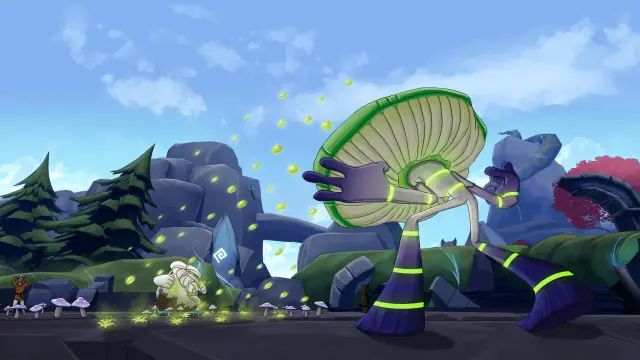
Once you gear up for battle, you get to experience essentially traditional turn-based gameplay, moving across the battlefield and strategically using your abilities to defeat your foe, with each ability using up a certain amount of mana. After a couple of turns though, the battlefield starts shrinking, making movement more limited, which could be an advantage or disadvantage depending on the kind of Vera you have and the combat style of the opposing one. Once you bring the Vera’s health to a low enough amount, you can try using the amulet to see if you can capture the Vera. If unsuccessful, you’ll just have to see the fight all the way through.
This about sums up the core gameplay that is available in the game’s current state. While PvP was recently present, this mode has been temporarily taken down in the final patch of 2023 because the developers are setting up the foundation for some big plans for this year.
Final Thoughts
Overall, once you manage to claim some test tokens, you are in for a decent free-to-play strategic experience that is continuously being improved with new updates over time. While play-to-earn mechanics are currently not included, if you end up becoming one of the top public testers during this testnet phase, then you are likely set to receive some rewards in the mainnet launch as the developer’s token of gratitude for helping them in creating a fun Pokemon-like Web3 title.


